Zaxbys
- 3.0
- Rating
- 1.00M
- Installs
- Free
- Price

 Analysis by App-foxy
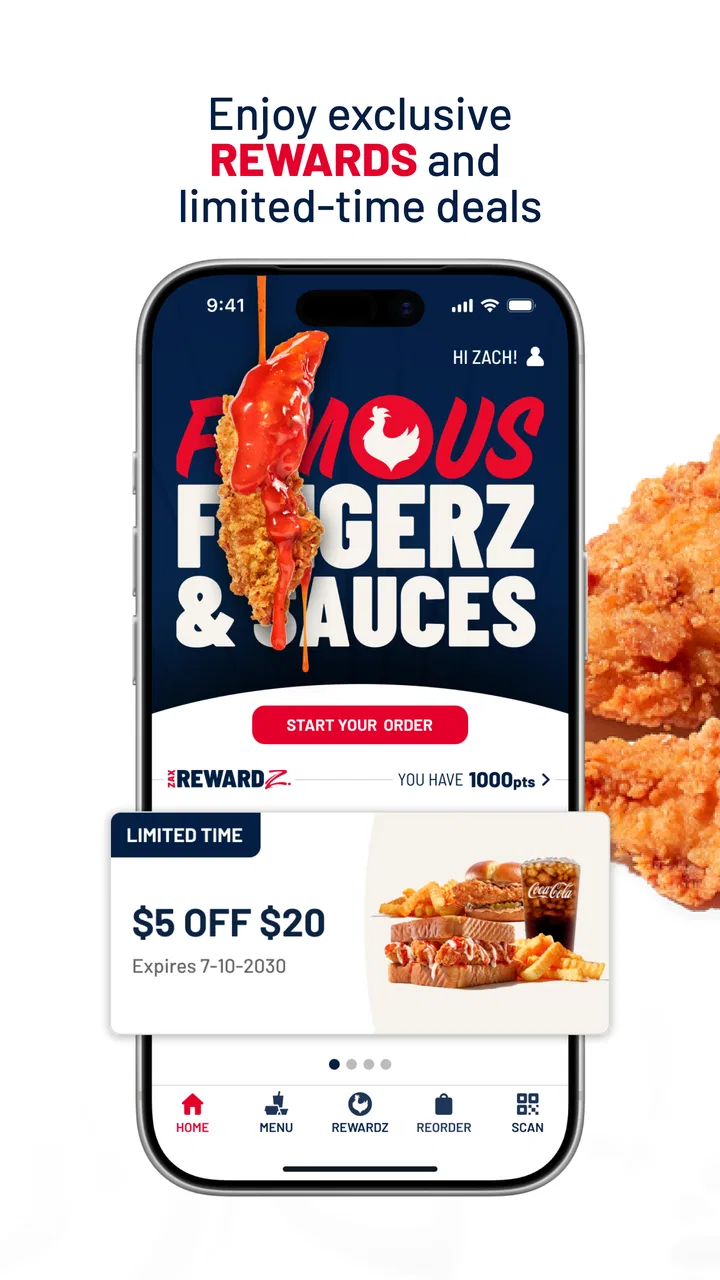
Ordering food from a familiar restaurant sounds simple, but the experience can become surprisingly uneven when an app is slow, confusing, or unreliable at the moment you are hungry. I spent time looking at Zaxbys as a practical Food & Drink app, focusing less on its short store promise and more on how it fits into an ordinary meal routine. Its purpose is clear: place an order, build a relationship with Zaxby’s rewards program, and use those rewards later.
The app is free, aimed at Everyone, and comes from Zaxby's Franchising, LLC. It has been available since December 15, 2016, and its current version is 12.12.1. With over a million installs, it is not an obscure experiment, although its average rating sits at 3.0 from around 7,400 ratings and roughly 4,200 written reviews. That combination tells me to approach it as a useful restaurant companion with some room for frustration, rather than as a flawless ordering tool.
How Zaxbys feels when speed matters
The strongest reason to use the app is convenience. If I already know I want Zaxby’s, ordering through a dedicated app can feel more direct than searching the web, opening a delivery service, or explaining the order at the counter. The central idea is easy to understand: choose food, submit the order, and earn or redeem rewards as part of the same restaurant visit.
You May Also Like

 Blood Strike: 2.5 Anniversary
Blood Strike’s Loadouts Turn Every Drop Into a Tactical Gamble
A close look at Blood Strike’s custom loadouts: how fast access to signature weapons reshapes its battle royale rhythm, rewards preparation, and narrows the gap between fights.

 Pandora - Music & Podcasts
Pandora’s Music Is Easy to Start, but Harder to Recover
Pandora’s strength is its low-effort path from a seed to a station. Its weak spot is how much confidence it asks you to place in connection, setup, and quiet recovery.

 8 Ball Pool
 Is Built on Rivalries, Rematches, and Routine
A close look at the rivalries, rematches, shared routines, and unanswered safety questions that turn a quick pool match into a persistent mobile community.

 Samsung Music
’s Quiet Strength Is Playing What You Already Own
Its reach comes less from spectacle than from dependable access to a personal library. That simplicity is both the app’s strongest retention engine and its ceiling.

 AccuWeather: Weather Radar
AccuWeather Review: A Quick, Clear Forecast for Everyday Decisions
For everyday plans, the best forecast is the one you can understand quickly. AccuWeather makes rain timing, radar, and local conditions easy to act on, with a few trade-offs.

 Hill Climb Racing
Why Hill Climb Racing Still Turns Crashes Into One More Run
A tiny car, a bumpy hill and one more upgrade: Hill Climb Racing keeps resurfacing because its simple chaos makes every near-miss feel personal.
More From Our News Desk



Speed here should be judged in two ways. There is the time spent navigating the app, and there is the time saved once the order is ready to send. A familiar customer who has already decided what to eat should benefit most. The app is not trying to help me compare every restaurant in town; it is designed for someone who has already chosen Zaxby’s and wants a more convenient route to that meal.
That distinction matters. A general delivery app may be better when I am undecided, comparing restaurants, or trying to see several cuisines in one place. Zaxbys is more focused. Its advantage is the direct connection to one chain, while its limitation is equally obvious: there is no reason to open it when I am not considering Zaxby’s.
In a normal lunch scenario, I would use it before leaving work, select the restaurant that makes sense for my route, and place the order while I still have time to travel. That workflow can reduce the need to stand in line, but I would still check the order details carefully before confirming. A dedicated restaurant app is only helpful if the final selection, location, and reward choice are correct.
The practical speed advantage is preparation, not magic. If I repeatedly order the same kind of meal, the app can become a shortcut in my routine. If I am browsing slowly, changing my mind, or trying to coordinate several people with different preferences, the benefit becomes smaller and a broader ordering service may feel easier.
What makes repeat ordering more useful
The rewards element gives the app a purpose beyond a one-time digital menu. I would pay attention to the order-and-redeem cycle rather than treating rewards as an afterthought. When I am already planning to buy from the chain, keeping the reward activity in the same place can make the app worthwhile over time.
One useful habit is to decide before checkout whether I am earning toward a future benefit or using an available reward now. That sounds obvious, but it prevents the common mistake of completing an order first and only then wondering whether a reward should have been applied. I would also review the final order summary instead of relying on memory, especially when customizing food for more than one person.
This is where the app can be more convenient than a phone call. A written order gives me a chance to inspect what I selected, while a call requires listening, remembering, and repeating details. On the other hand, a phone conversation can be better for unusual requests or questions that a standard ordering flow does not explain clearly.
Busy moments and heavier use
The most demanding moment is not necessarily opening the app. It is the entire sequence from choosing a location to submitting an order while I am in a hurry, on a weak connection, or coordinating a group meal. Every extra screen or delayed response matters more when several people are waiting for a decision.
For a solo order, the experience should be relatively straightforward in principle. For a family or office order, the risk of friction increases because I have to check quantities, preferences, and the intended pickup location. I would build in a little time rather than waiting until the last possible minute. That is sensible with any restaurant ordering tool, but it is particularly important when the app is not the only factor involved; restaurant workload and local availability can affect the overall result too.
I would not use the app as a guarantee that food will be ready at an exact moment. It is an ordering channel, not a replacement for judgment about traffic, a crowded restaurant, or a changing schedule. If timing is critical, I would submit earlier and keep the confirmation available until the order is collected.
Another heavy-use situation is reward redemption during a busy visit. Rewards are attractive because they can lower the effective cost of a planned meal, but they also add a decision point. I would avoid rushing through that step. Before sending the order, I would confirm whether the reward has been selected and whether the rest of the basket still reflects what I intended to buy.
This is a small but important trade-off: the app combines ordering and loyalty activity, which is convenient, but the combined flow gives me more details to verify. People who prefer the simplest possible checkout may find a direct counter order less mentally demanding, especially for a small purchase.
Reliability in everyday use
The rating of 3.0 suggests that the overall experience has not been equally smooth for everyone. I would not interpret that number as proof that the app fails on every device or every order, but it is a reason to keep expectations realistic. A restaurant app can be perfectly usable for one visit and frustrating on another, particularly when a user is dealing with connectivity, location selection, account access, or an order that needs correction.
My approach would be to treat the app as a convenience, not as the only way to reach the restaurant. If an order is important, I would keep the confirmation information until the meal is collected. If something looks wrong, I would resolve it before assuming that a tap has completed the process. This is especially sensible when using rewards, because an unclear order state can make it harder to know whether a benefit was applied.
Recovery is another part of reliability. When an app behaves unexpectedly, the best recovery plan is simple: stop repeating the same action, check whether the order or reward already went through, and then use the restaurant’s normal support route if necessary. Repeated taps can create confusion, so I would avoid submitting again until I know what happened.
The app’s long availability and large install base make it feel established rather than brand new. Still, an established app can have an uneven reputation, and the average rating is a useful warning not to assume that familiarity equals perfection. I would be comfortable trying it for a routine order, but I would not build an important event around a single untested digital workflow.
For users who order from Zaxby’s often, the rewards function may justify tolerating occasional friction. For someone who visits rarely, the setup and account-related steps may not feel worth it compared with ordering directly. That is one of the clearest situations where the usual alternative is better: if I want one quick meal and do not expect to return, a counter order or broader delivery app may be more convenient.
Device age, compatibility, and resource expectations
The minimum operating system is Android 7.0, which makes the app accessible to many older Android phones. That is helpful for people who do not replace devices frequently. At the same time, compatibility alone does not tell me how comfortable the app will feel on an older handset. A phone can install an app and still feel slower when storage is tight, background activity is busy, or the connection is inconsistent.
I would leave some free storage and close unrelated apps if the phone is older or already struggling. I would also avoid judging the app solely by a slow moment in a crowded location, because network conditions can affect restaurant ordering more than the app itself. The useful question is whether the delay repeats across ordinary conditions.
There is no good reason to install it on every family member’s phone. The person who usually places the order is the one who benefits most. Keeping the ordering process with one responsible user can reduce duplicate orders, mixed-up rewards, and confusion about which device contains the current order information.
On iOS, I would check the current store compatibility details before installing, since the confirmed minimum operating-system information here is specifically expressed as Android 7.0. That does not make the app unsuitable for Apple users; it simply means I would verify the device requirement in the relevant store rather than assume that an Android requirement applies unchanged.
Resource demands should also be considered practically. A Food & Drink app is not the sort of tool I would install for continuous use. I would open it when ordering, complete the transaction, and close it afterward. That limited usage pattern reduces the importance of long-term background behavior and makes it easier to reserve the app for the moments when its restaurant-specific features matter.
Who gets the most value from it
I think the best audience is a repeat Zaxby’s customer who wants ordering and rewards in one place. If I already know the menu, visit the chain regularly, and prefer preparing an order before arriving, the app has a clear role. It can also suit someone who dislikes placing orders verbally and prefers reviewing selections on screen.
It is less compelling for diners who want to compare multiple restaurants, split a complicated group order across different places, or rely on a delivery marketplace for broad coverage. Those users may find a general food-ordering service more flexible. Someone who rarely visits Zaxby’s may also decide that the regular restaurant website, a phone call, or the counter is enough.
People who are especially sensitive to app reliability should pay attention to the middling rating before making it their only ordering method. I would try it during an ordinary meal first, not during a rushed trip or an important gathering. That gives me a chance to understand the ordering flow and reward handling without creating unnecessary pressure.
There is also a useful distinction between convenience and control. The app gives me more control over reviewing a digital order, but less flexibility than speaking directly with staff when I need an explanation or a nonstandard request. Neither approach is universally better. The right choice depends on whether my order is routine enough for a structured flow.
My performance verdict after weighing the trade-offs
Zaxbys works best as a focused repeat-ordering tool, not as a complete solution for every dining situation. Its free price removes the financial barrier to trying it, and its combination of ordering with earning and redeeming rewards gives regular customers a practical reason to keep it installed. The Android requirement also leaves room for use on older supported phones, which is a welcome point for people who do not own the newest hardware.
My positive view is tempered by the 3.0 average and the experience implied by that middling reception. I would expect the app to be useful when the order is routine and the connection is stable, while accepting that a busy or unusual order may require more attention. I would not call it the fastest option for discovering food, because it is tied to one restaurant. I would not call it the safest option for a time-critical meal unless I had already tested it on my device.
The smartest workflow is to install it for the person who orders most often, use it first for a simple purchase, check the location and basket before submitting, and keep the confirmation until pickup is complete. Once that routine feels dependable, rewards can make repeated use more worthwhile. If the app creates more uncertainty than convenience, there is no shame in returning to the counter, calling the restaurant, or using a broader ordering alternative.
Overall, I would recommend trying it to regular Zaxby’s customers who value a direct ordering path and want rewards attached to their visits. I would skip it if I am only looking for a general restaurant marketplace or if I need maximum flexibility for unusual orders. It is a specialized tool with a sensible purpose, but the uneven rating means I would use it with a backup plan rather than treating it as indispensable.
FAQs for Zaxbys
01What is the Zaxby’s app used for?
The Zaxby’s app is designed to enhance the customer experience by allowing users to browse the menu, place orders, and earn rewards. Through the app, you can easily find your nearest Zaxby’s location, customize your orders to your liking, and access exclusive promotions and discounts. It's a convenient tool for Zaxby’s fans.
02How do I earn and redeem rewards on the Zaxby’s app?
Earning rewards on the Zaxby’s app is simple. Every purchase you make through the app contributes points to your account. Once you accumulate enough points, you can redeem them for various rewards like free menu items. The app also notifies you of special promotions that can boost your rewards earning potential.
03Is the Zaxby’s app available on both Android and iOS?
Yes, the Zaxby’s app is available for download on both Android and iOS platforms. You can find it on the Google Play Store for Android devices and the Apple App Store for iOS devices. Ensure your device meets the necessary system requirements to enjoy a smooth user experience.
04Can I customize my order through the Zaxby’s app?
Absolutely! The Zaxby’s app allows for full customization of your orders. Whether you want to add extra sauce, remove a topping, or select a different side, the app provides options to tailor your meal exactly to your preferences. This feature ensures you get your ideal Zaxby’s experience every time.
05What should I do if I encounter issues with the Zaxby’s app?
If you experience any issues with the Zaxby’s app, there are a few steps you can take. First, ensure your app is updated to the latest version. Try restarting your device or reinstalling the app. If problems persist, contact Zaxby’s customer support through their website or directly within the app for assistance.
Pros
- User-friendly interface for easy navigation.
- Loyalty program offers great rewards.
- Menu updates keep choices fresh and exciting.
- Fast delivery service for quick meals.
- Nutritional info available for informed choices.
Cons
- Limited customization options for orders.
- Occasional app crashes disrupt ordering process.
- Delivery fees can be relatively high.
- In-app promotions are sometimes outdated.
- Not all locations support app features.

Zaxbys
Gallery